
For SMEs, CRA Account Login security is no longer just an IT issue. It affects access to payroll, business tax records, online correspondence, account updates, and filing activity. The CRA says most business correspondence is now delivered online through My Business Account, and it also tells users to protect their accounts with strong unique passwords, multi-factor authentication, and email notifications. For a growing business, that means weak account security can quickly become a tax, payroll, or compliance problem.
The biggest CRA login risks for SMEs in 2026 are phishing, reused or weak credentials, missed warning signs inside My Business Account, and delayed action after suspicious changes appear. The CRA recommends monitoring your account regularly, using strong passwords, keeping contact information current, and enrolling in multi-factor authentication. If you suspect a compromise, review the account immediately, report it to CRA, and confirm whether banking details, authorized representatives, filing access, or online mail settings were changed.
Why CRA account login security matters more in 2026
Many small business owners still think of CRA access as a once-in-a-while login used for filing. That is outdated. Today, CRA account access is tied to business correspondence, filing credentials, payroll activity, and important account settings. According to the CRA’s page on online mail for business, the agency transitioned most business correspondence to online delivery starting in May 2025, and that correspondence is considered received on the date it is posted to My Business Account. That means a security issue is no longer just an inconvenience. It can become a missed notice, missed deadline, or missed response window.
The risk is broader than somebody simply getting into your account. A compromised CRA login can lead to unauthorized changes to mailing address, banking or direct deposit details, and representative access. The CRA’s account protection guidance tells users to watch for those exact changes and to report them if they appear unexpectedly. For an SME, that is an operational control issue, not just a password issue.
What are the biggest CRA account login risks in 2026?
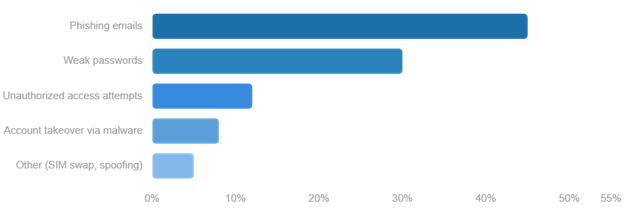
The main risks are phishing, credential theft, weak password habits, and unauthorized changes after someone gains access. The CRA’s page on recognizing a scam says scammers often pretend to be from the CRA and use pressure, urgency, or threats to push people into sharing information or acting too quickly. Its account protection page also tells users not to share user IDs and passwords and to use different passwords for different accounts.
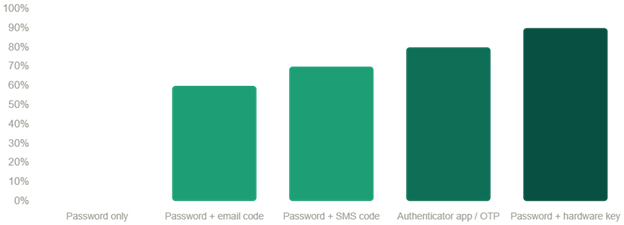
A second risk is assuming that basic login access is enough. It is not. The CRA’s multi-factor authentication help page says MFA is mandatory for all users who want to use a CRA account, and that users who do not already have one may be prompted to add a backup MFA option. That matters because a business account should not depend on one password and one device alone.
A third risk is failing to use email notifications. On the CRA’s page about email notifications for businesses, the agency says it can notify businesses when important changes are made on the account and when new mail is available in My Business Account. That is one of the simplest early-warning tools available to SMEs, yet many still do not use it consistently.
How CRA phishing scams usually work
Phishing scams work because they are designed to feel urgent and official. A message may claim that your business refund is pending, your account needs verification, your access is suspended, or penalties will apply unless you act immediately. The CRA’s scam recognition page says scammers often contact people pretending to be from the CRA and rely on pressure, urgency, and fake legitimacy to get results.
The CRA also gives useful negative examples. It says it will not send refunds by e-transfer or text message, demand immediate payment through gift cards or cryptocurrency, threaten deportation or arrest, or ask for personal or financial information in a voicemail or email. Those are all warning signs that the communication is fraudulent. If a message pushes you to click a link, confirm credentials, or send sensitive information right away, the safer move is to leave the message alone and go directly to the official CRA site yourself.
For SMEs, phishing is especially dangerous because one compromised login can affect multiple business functions. A successful attack can expose payroll access, business mail, filing credentials, or representative settings. That is why account security cannot sit with just one person informally. It needs to be treated as part of business governance. This is consistent with the CRA’s broader external-threat security controls, which emphasize layered account protection.
Warning signs SMEs should check right now
The most practical warning signs are the ones the CRA itself lists. On its keep your CRA account secure page, the CRA says users should look for unexpected changes to mailing address, banking or direct deposit details, and authorized representatives. It also tells users to monitor their accounts regularly for suspicious activity.
For businesses, the CRA’s email notification page adds another important detail: notifications can alert you when important account changes are made and when you have new mail to view in My Business Account. That means you should not just ask, “Can we still sign in?” You should also ask:
- Did our address change?
- Did our banking details change?
- Was a representative added or removed?
- Did password or MFA settings change?
- Is there new CRA mail no one expected?
- Has the account been locked or reset unexpectedly?
Those are the kinds of changes that can show up before a business realizes there is a broader problem.
How SMEs can protect their CRA account login
The strongest protection comes from a few disciplined habits working together.
Start with password hygiene. The CRA says on its account protection guidance that passwords, security questions, and answers should be changed regularly, and that users should never use the same password for different online accounts. For SMEs, that matters because credential reuse turns one breach into a system-wide problem.
Next, use multi-factor authentication properly. The CRA’s MFA page explains that MFA requires a one-time passcode every time you sign in, and that users can add or change MFA options in security settings. It also says backup MFA is being introduced more actively. For a business, backup MFA is not just a security feature. It is also a recovery tool if one device or method fails.
Then, make use of email notifications. On the CRA’s business notifications page, the agency says businesses can be notified when new mail is available and when important account changes are made. Since most business correspondence is now sent online, these notifications are one of the easiest ways to catch problems early.
Finally, review internal access controls. The CRA’s account protection guidance also refers to authorized representatives. For SMEs, that means reviewing who actually needs access, removing stale permissions, and making sure a change in staff or advisors is reflected in the account quickly. A secure login process is only as strong as the people who still have access.
How to recover from a compromised CRA account
If you suspect the account has been compromised, do not wait for certainty. The CRA’s page on reporting a scam or identity theft says suspicious activity should be reported, even where the full facts are still being worked out. Waiting too long often makes the cleanup harder.
The CRA also explains on its page about how it secures compromised accounts and what may happen next. For businesses, it may temporarily stop payments, disable web access codes for electronic filing, work with the business to reactivate accounts, resume payments, and issue new access codes if needed. It may also notify you if employee information may have been accessed without authorization. Those are serious downstream effects for an SME.
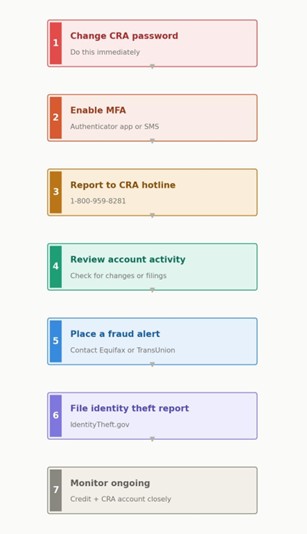
A practical recovery process looks like this:
- Change any compromised credentials immediately.
- Review the entire CRA account for unauthorized changes.
- Report the incident through CRA’s official reporting channels.
- Confirm whether payroll, direct deposit, banking, filing codes, or representative access were affected.
- Check whether employee information may also have been exposed.
- If broader fraud is involved, follow the CRA’s direction to notify banks, police, and the Canadian Anti-Fraud Centre where appropriate.
Common mistakes in CRA account security
The most common mistakes are avoidable. One is using weak or reused passwords. Another is treating MFA as optional when the CRA clearly treats it as part of standard sign-in protection. A third is failing to register for notifications even though the CRA says they can alert you to new mail and important account changes. A fourth is trusting unsolicited messages that use urgency and official-looking language without verifying them through the CRA directly. All of these mistakes are addressed, directly or indirectly, in the CRA’s pages on protecting your account, recognizing scams, and email notifications for businesses.
FAQ
What is the biggest CRA account login risk for small businesses?
Phishing is usually the entry point, but the bigger business risk is often what happens next: unauthorized account changes, missed online mail, or interrupted filing and payroll access. CRA’s scam and account-protection guidance point to both sides of that risk.
Should I enable multi-factor authentication for my CRA account?
Yes. The CRA says MFA is mandatory for users who want to use a CRA account, and it is also encouraging users to add backup MFA.
How do I know if my business has been targeted?
Unexpected changes to address, banking, direct deposit, representatives, password status, MFA settings, or online mail activity are all warning signs the CRA tells users to monitor.
What should I do if I think my CRA account has been compromised?
Report it to CRA, review the account immediately, and confirm whether payments, filing access, or account details were changed. CRA says it may disable access or web access codes and help businesses restore secure access if needed.
Final Takeaway
In 2026, CRA Account Login security is really a business-process issue disguised as a login issue. Strong passwords, MFA, backup MFA, regular account review, and email notifications are not extra admin. They are part of basic control over your payroll, correspondence, and filing environment. The CRA’s own guidance is consistent on this point: monitor the account, verify suspicious messages, keep contact information current, and act quickly if anything changes that you did not authorize.
- Sources & References
Canada Revenue Agency — security and fraud guidance for taxpayers and businesses. - https://www.canada.ca/en/revenue-agency/services/security-fraud.html
CRA — identity theft information, including recovery steps and reporting. - https://www.canada.ca/en/revenue-agency/services/identity-theft.html
CRA — recommended best practices for e‑services and login protection.
https://www.canada.ca/en/revenue-agency/services/e-services.html - FBI — overview of reported fraud losses and trends, including internet crime.
https://www.ic3.gov/AnnualReport/Reports/2024_IC3Report.pd - U.S. government portal for identity theft reporting and recovery resources.
https://www.identitytheft.gov/report/report - Canada.ca collection of CRA‑related phishing examples and how to identify them.
https://www.canada.ca/en/revenue-agency/services/security-fraud.html#examples - FTC — detailed consumer guidance on credit freezes and fraud alerts. https://consumer.ftc.gov/articles/credit-freezes-and-fraud-alerts
